HomePrintersBuy

Does the 123inkt LW650 work with LumenLabel on a Mac?

Yes. The 123inkt LW650 has been tested with LumenLabel over USB on a Mac. You can also connect it over Bluetooth. A 36 × 89 mm label is a useful size for trying the printer with your own roll.

Tested on real hardware over USB

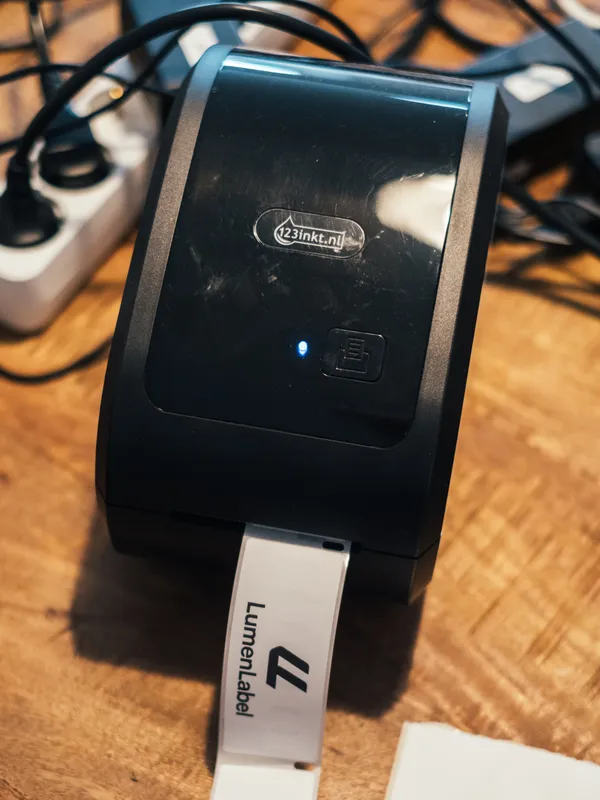
123inkt LW650 label printer
123inkt LW650.

The box said LW650. The printer itself said something else.

Koert deliberately selects printers that add something new to the test bench: a popular model, a unique size or another connection. The LW650 was interesting because 123inkt is a familiar brand, the printer has Bluetooth and it represents another group of compact label printers. Koert found a used one.

The first connection behaved differently than expected. Connected directly over USB-C to USB-C, the printer did not appear on Koert's Mac. It did appear among the Bluetooth devices. At first that looked like Bluetooth Classic, but it turned out to be BLE. Using USB-C to USB-A through a dock, the Mac detected it over USB and Koert could print quite quickly.

The name reported by the printer was not enough to identify it properly. Once the exact model was clear, a complete 99012 label came out. LumenLabel therefore looks at the model itself instead of relying on a general family name.

For the person using it, most of that investigation disappears into a simple result: it is detected and it prints. Koert cannot promise that every device, cable and computer will always behave in the same way. The test says what worked with this printer. The Labelife app is fine in its own right, but it is made for this group of printers. LumenLabel is intended to let different supported printers work from the same app.

Which labels fit the LW650?

Select the size that is physically loaded. The 36 × 89 mm 99012 size has been tested. There is no RFID roll recognition for LumenLabel to rely on; the printer uses the black marks to find label boundaries.

According to 123inkt, media can be up to 62 mm wide while the printable area is up to 56 mm wide. Keep your design inside that print width.

Do DYMO-compatible labels work without a chip?

The tested 99012 size is familiar from DYMO rolls, but the LW650 does not use a DYMO roll chip. LumenLabel treats it as a physical size and sensor layout.

Another supplier can use different marks, liners or tolerances. Load a new roll, check where the printer stops after one label and keep the design inside the 56 mm manufacturer print area.

Can the LW650 print standard shipping labels?

Not at the common 4 × 6 inch size. The printer accepts media up to 62 mm wide and has a manufacturer-stated maximum print width of 56 mm.

It can produce narrower address, barcode, warehouse and product labels. Use a printer with at least 102 mm of print width for regular carrier labels.

Connect the LW650 in four steps.

  1. 01

    Load the roll, switch the LW650 on and note the exact label size.

  2. 02

    Connect it over USB, or enable Bluetooth and keep the printer near the Mac.

  3. 03

    Open LumenLabel and select the entry recognised as 123inkt LW650.

  4. 04

    Select the loaded size, check the 1-bit preview and print one 99012 test label.

!If the printer does not appear as a 123inkt LW650, do not pick another model at random. Attach the diagnostics report from LumenLabel to your support request.

123inkt LW650 questions

01How can I connect the LW650?+

Over USB or Bluetooth. In LumenLabel, select the connection where the printer appears as a 123inkt LW650.

02Does the LW650 work on Windows?+

The Windows app includes a profile for the LW650. Use the trial to check your own printer and connection.

03Can I use the LW650 over Bluetooth?+

Yes. Turn on Bluetooth, keep the printer nearby and select the LW650 when it appears in LumenLabel.

04Can I use DYMO 99012 labels?+

The 36 × 89 mm size was physically printed. Start each roll from another supplier with one test because marks, liners and tolerances can differ.

05Has the LW650XL Pro been tested too?+

No. This page only covers the LW650. Treat the LW650XL Pro as a separate model and check it during the trial.

Start with the size that is actually in your printer.

Connect the LW650, select the loaded roll and print one small label. If the black mark, crop and darkness are correct, start the run.