HomePrintersBuy

Does the DYMO LabelWriter 450 Turbo still work without DYMO's own software?

Yes. LumenLabel talks to the LabelWriter 450 Turbo directly over USB, without DYMO Connect and without a driver. Tested on real hardware with standard address labels. If DYMO's software stopped recognising your printer after an update, this route does not depend on it.

Tested on real hardware over USB

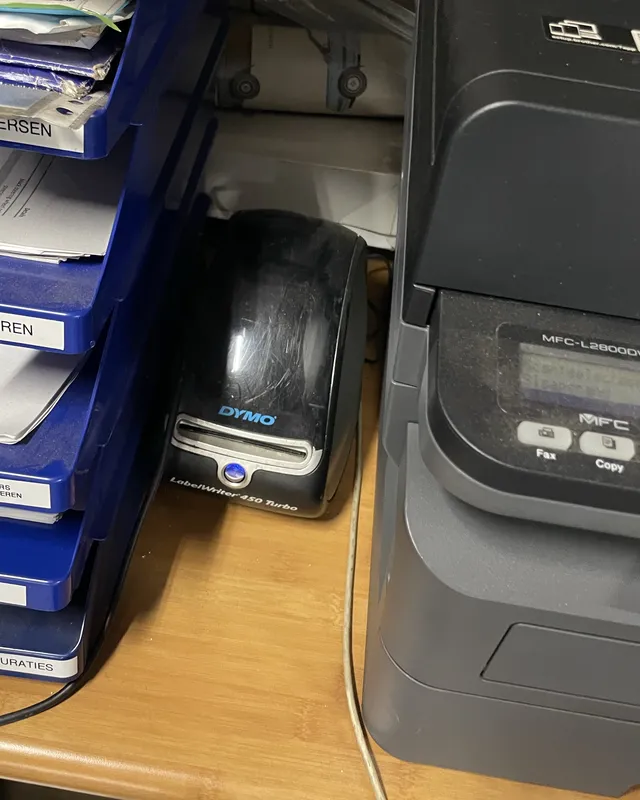
A DYMO LabelWriter 450 Turbo tucked away between blue letter trays full of paper and a large office printer
The tested LabelWriter 450 Turbo.

It was being used as a label dispenser.

My first tester was my brother-in-law at the family car garage. LumenLabel could not see his printers. One of them turned out to be a DYMO LabelWriter 450 Turbo, and it was not even plugged into his computer. It sat between the letter trays, connected to my father-in-law's PC.

He mostly used it as a label dispenser. Press the feed button, a blank label comes out, write on it by hand. Printing through DYMO's own software was too much hassle for him.

I had already built the newer LabelWriter 550 and 5XL into LumenLabel. I assumed the 450 would speak the same language. It does not. The 450 speaks the older, much simpler language of the first LabelWriters: no label chip, and it says little more back than that it is ready. So I borrowed the printer, plugged it into my Mac on the garage counter and built that older language into LumenLabel separately.

The first prints were off by a few millimetres. The print head on this model starts about six millimetres after the edge of the label and a bit in from the side. Once that was measured and built in, the address labels came out exactly where the design put them. Three test prints and a logo print later, it went back between the letter trays.

Which labels can the LabelWriter 450 Turbo use with LumenLabel?

The 450 Turbo prints at 300 dpi on rolls up to 62 mm wide. LumenLabel has the common LabelWriter sizes ready: 99010 address labels (28 × 89 mm), 99012 large address labels (36 × 89 mm), 99014 shipping labels (54 × 101 mm), 99015 multipurpose labels (54 × 70 mm) and the smaller 11352 and 11354 sizes.

This printer has no label chip. It does not know which roll is loaded, so you pick the size yourself in LumenLabel. That also means it takes compatible labels from other brands, which the newer 550 series refuses.

Why does the print start a little way in from the edge?

The print head of the 450 Turbo sits about 6 mm past the leading edge of the label and about 1.5 mm in from the side. Anything the printer is asked to put in that strip simply does not appear. LumenLabel already accounts for both distances, so the canvas you see is the area that actually prints.

Rolls have a little sideways play in the holder. If a print sits slightly off on your roll, use the X and Y position settings in the printer settings to shift it by tenths of a millimetre.

What can I do if the labels print too light or too dark?

The 450 Turbo has four darkness steps: light, medium, normal and dark. LumenLabel starts at normal, the same as DYMO's own default. Change the darkness in the printer settings and print one label to check.

If a label comes out blank, check that the roll is loaded with the print side facing the head, and that the labels are pushed all the way in until the printer pulls them through.

Connect the LabelWriter 450 Turbo in four steps.

  1. 01

    Connect the printer to your Mac or Windows PC over USB and switch it on. You do not need DYMO Connect or a DYMO driver.

  2. 02

    Load a roll and feed the labels into the slot until the printer pulls them through by itself.

  3. 03

    Open LumenLabel and select the DYMO LabelWriter 450 Turbo as the printer in the top-right corner.

  4. 04

    Open the printer settings, choose the label size that matches your roll and print one label.

!The 450 Turbo does not report which roll is loaded. A wrong size in LumenLabel prints over the edge of the label or onto the next one, so check the size once before a batch.

DYMO LabelWriter 450 Turbo questions

01DYMO's software no longer recognises my 450 Turbo after a macOS or Windows update. Does this help?+

LumenLabel does not use DYMO Connect or the DYMO driver at all. It sends its own print data to the printer over USB. If the printer itself still works, that route keeps working after an update of DYMO's software or your operating system.

02Does LumenLabel work with the LabelWriter 450 without Turbo, or the Twin Turbo and 4XL?+

The regular LabelWriter 450 speaks the same language and has a profile in LumenLabel, but that one has not been tested on hardware yet. The Twin Turbo, Duo and 4XL are not in the app yet. If you have one, get in touch and include the exact model.

03What about the LabelWriter 550 and 5XL?+

Those speak a newer language and only accept DYMO's own chipped labels. LumenLabel supports them separately; the 5XL has been tested on hardware.

04Can I use non-DYMO labels?+

Yes. The 450 Turbo has no label chip, so it prints on any roll of the right size. Choose the matching size in LumenLabel.

05Can LumenLabel see when the labels have run out or the lid is open?+

Not on this model. The 450 Turbo only reports that it is ready; the lid has no switch. Keep an eye on the roll yourself during a longer batch.

Print one label with your own roll first.

The tested 450 Turbo went back to the garage, so what is on this page is what was measured there. Your cable, firmware and roll can still differ. Start with one label. If it lands where you designed it, keep going.