HomePrintersBuy

Does an old Brother PT-1950 still work with LumenLabel on a Mac?

Yes. The Brother PT-1950 has been tested with LumenLabel over USB on a Mac. You can use 6, 9, 12 and 18 mm TZ or TZe tape and print several labels on one strip.

Tested on real hardware over USB

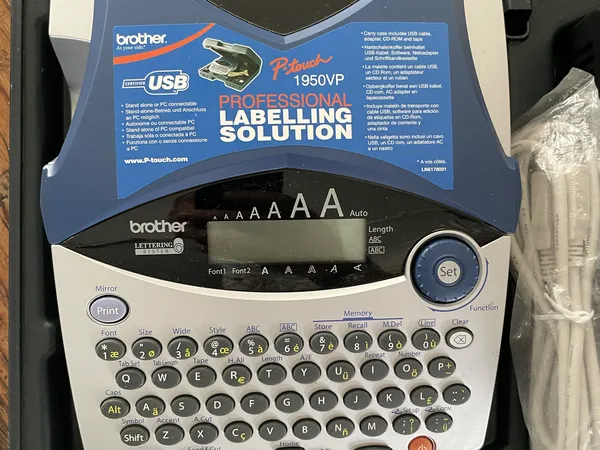
Brother PT-1950 label printer with keyboard
Brother PT-1950.

The case was opened one more time.

The PT-1950 came in a case. It had a large keyboard, a small display, narrow smooth labels and a USB port on the side. Even the old booklet and CD were still there. Without a computer, the keyboard offered a few fonts, upper- and lowercase and a line. That is still useful when working away from a desk.

Koert connected it to see what LumenLabel could do. The app immediately detected a USB device, but not yet a supported printer. After three or four hours of investigating, nothing had come out and the cutter still did nothing. The case was closed again.

Later, he tried once more. That was when the cut code and the rules for the cut marks became clear. A white section came first, followed by the marks, the text and another set of marks. Then it printed. A few hours later, his own text, fonts and fine lines were on the tape.

The test strips were not only technical lines. Koert also used hearts, icons and short kind messages. At the same time, the strips showed the size of the label and the part the printer could actually print and cut. That fits the basic idea that the canvas and physical output should match one to one.

The PT-1950 is old, but it is still useful for narrow name, cable and organisation labels. That is why this exact model has its own profile in LumenLabel.

Which tape does the PT-1950 use in LumenLabel?

LumenLabel provides continuous 6, 9, 12 and 18 mm TZ and TZe tape sizes. A narrower tape uses only part of the print head, so select the width that is physically loaded and check a short test strip.

This is thermal-transfer tape with ink inside the laminated cassette. It is not the same media as a direct thermal shipping label.

Why is there white tape before a single label?

The distance between the print head and cutter is built into the machine. A single label therefore starts with a white section of tape.

In a run, LumenLabel can place several pages in one job. The leading white section then appears once and the labels follow on the same strip.

What do short cut and strip mode actually do?

Short cut places the cut closer to the print and can add a cut line. It still makes a complete cut.

Strip mode lets you print up to twenty pages in a row. Copies, sequences, selected Data rows and Shipping pages can all go on the same strip.

Connect the PT-1950 in four steps.

  1. 01

    Load a 6, 9, 12 or 18 mm TZ or TZe cassette and switch the printer on.

  2. 02

    Connect the PT-1950 directly to your Mac over USB.

  3. 03

    Open LumenLabel and select Brother PT-1950 as the active printer.

  4. 04

    Select the loaded tape width, check the 1-bit preview and print one short label.

!If LumenLabel only shows an unknown Brother device, send the detection data with a support request. Do not select a QL profile at random.

Brother PT-1950 questions

01Do I need the old P-touch Editor?+

No. You can design and print in LumenLabel. Files and features from P-touch Editor are not imported automatically.

02Does the PT-1950 work with an Apple silicon Mac?+

Yes. The PT-1950 has been tested on a Mac, and LumenLabel supports Apple silicon from macOS 13.

03Can I use 24 mm tape?+

No. The PT-1950 profile stops at 18 mm, matching the recorded maximum for this model.

04Can I print Excel rows on one strip?+

Yes. Selected Data rows and several copies can be printed on the same strip. Start with a short run to check your tape setting.

05Does this test also cover the PT-1960?+

No. This page only covers the PT-1950. Treat a PT-1960 as a separate model and check it during the trial.

Give an old printer one new strip first.

Connect the PT-1950, select the tape that is actually loaded and print a small design. If the text is sharp and the cutter behaves as expected, start the rest of the run.