
HomePrintersBuy

Does the Zebra LP 2844-Z still work on a modern Mac or Windows PC?

Yes, the -Z version does. The LP 2844-Z talks to LumenLabel directly over USB, without a driver. Tested on real hardware with 102 × 210 mm shipping labels. Check the label on your printer first, because the plain LP 2844 without the Z is a different printer. If that is the one you have, get in touch and we will see what is possible.

Tested on real hardware over USB

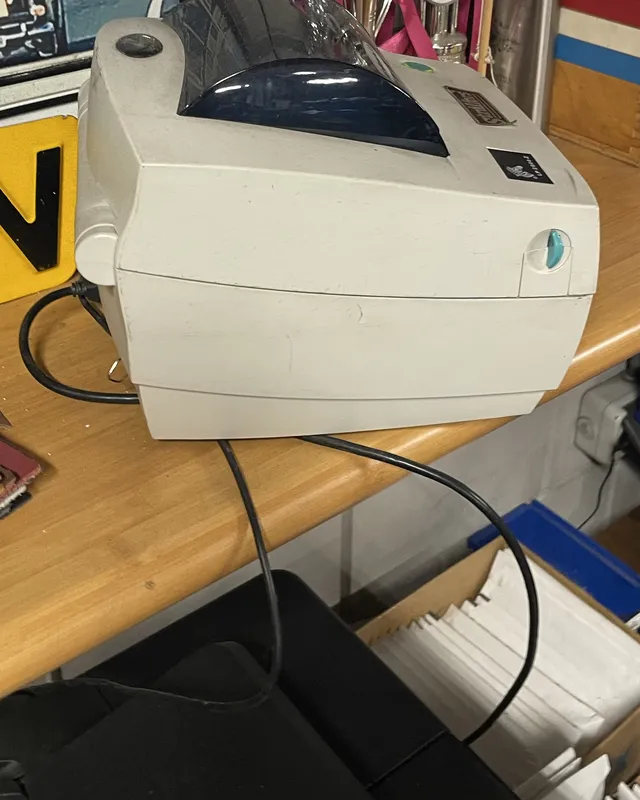
An older Zebra LP 2844-Z label printer on a wooden shelf in the garage, with its USB cable running down
The tested LP 2844-Z

A printer from another era, and it just kept going.

The Zebra LP 2844-Z at the family car garage has been printing shipping labels for years. It sits on a shelf above the counter with a USB cable that runs three or four metres behind stacks of paper and through holes to the back of the computer. When my brother-in-law wanted to try LumenLabel, that printer was not on my list yet.

I knew the model name from second-hand listings, but not what it would say to my software. So I borrowed it, plugged it into my Mac on the counter and asked it. The answer was reassuring: it speaks the same language as the Zebra ZD220 I started LumenLabel with. The software inside the printer is from 2004 and misses a few of the newer questions the app can ask, but everything LumenLabel needs works.

The first test label from my own software came out clean: a frame, ticks every ten millimetres, an upright letter, a dot in the middle. That label was 210 mm long, which is what they use for their carrier's shipping labels, so I added that size to the standard list.

Then it went back on the shelf, cable and all. That part scares me more than the printing. Systems that have been running for years only need one wrong look. It was fine.

Which labels can the LP 2844-Z use with LumenLabel?

The LP 2844-Z prints at 203 dpi with a maximum print width of 104 mm. It takes labels from 19 to 108 mm wide and up to about 990 mm long, on gap, black mark or continuous media. A 4 × 6 inch shipping label (102 × 152 mm) fits, and so does the 102 × 210 mm size that the tested printer runs.

The printer measures the label length when it calibrates, and LumenLabel can match that to a known size. It does not measure the width, so check that against the roll or the packaging.

Why does the printer feed a few labels when I close the cover?

This printer calibrates when it is switched on and when the cover closes. It feeds a few blank labels to find the gap and measure the label. That is normal and it is how the printer learns where each label starts.

The tested printer runs 210 mm labels while the carrier's print is 200 mm high, so the last centimetre stays empty. My brother-in-law would like that print at the top of the label instead of the middle, so he can fold the empty end over the edge of the box. That is on the list. It is still a wish, not a feature.

What can I do if the LP 2844-Z prints faint?

Darkness on this printer runs from 0 to 30. The tested printer had been left at 30, the maximum, by whoever set it up years ago. LumenLabel starts at 15. If your labels come out light, raise the darkness in the printer settings first; the print head on an older printer often needs more than the default.

Then check the print head for dust and glue, and make sure the roll runs straight through the guides. Print one label after each change.

Connect the LP 2844-Z in four steps.

  1. 01

    Connect the printer to your Mac or Windows PC over USB and switch it on. You do not need a Zebra driver.

  2. 02

    Load the roll, close the cover and let the printer calibrate. It will feed a few blank labels.

  3. 03

    Open LumenLabel and select the Zebra LP 2844-Z as the printer in the top-right corner.

  4. 04

    Open the printer settings, check the label size and darkness, and print one label.

!Look at the model sticker on the printer. The LP 2844-Z with the Z works with this profile. The plain LP 2844 without the Z speaks a different printer language and is not supported by LumenLabel yet.

Zebra LP 2844-Z questions

01I cannot find a working LP 2844-Z driver for Windows 11 or my Mac. Do I need one?+

No. LumenLabel does not use a printer driver. It sends its own print data directly to the printer over USB, so the age of the driver does not matter. On Windows the printer can stay available to your other programs at the same time.

02What is the difference between the LP 2844 and the LP 2844-Z?+

The LP 2844-Z speaks the same language as newer Zebra printers, and is what this page is about. The plain LP 2844 speaks an older language that LumenLabel does not support yet. The Z is printed on the model sticker.

03Can I print 4 × 6 inch shipping labels?+

Yes. A 102 × 152 mm label fits within the 104 mm print width. Select the size in LumenLabel, calibrate once with the roll loaded and print one label before a batch.

04The printer is plugged into another computer in the office. Can I still use it?+

Yes, if that computer runs LumenLabel too. Since version 0.5.5 the computer the printer is plugged into can share it with a second computer on the same network. That is exactly how the tested LP 2844-Z is used at the garage.

05Can LumenLabel see when the cover is open or the labels have run out?+

Yes. The LP 2844-Z reports paused, head open and paper out over USB, and LumenLabel shows that. This older printer does not know a few of the newer messages, but those are not needed for printing.

Print one label with your own roll first.

The tested LP 2844-Z belongs to the garage, so what is on this page is what was measured there on one printer from 2004. Your cable, firmware and roll can still differ. Start with one label. If it is sharp and in the right place, keep going.